Parameters
This page provides a comprehensive list of all available parameters that can be used with our API. Each parameter is detailed with its default value, available options, whether it is required, and a description of its functionality.
These parameters allow you to customize requests for taking screenshots, extracting data, configuring proxies, setting viewport options, generating PDFs, and more. Use this guide to understand how to structure your API requests effectively.
You can use our interactive query builder in dashboard
Base
url
- Title: Url to website for take a screenshot.
- Default value: https://example.com
- Available values: Any valid URL
- Required: ✅
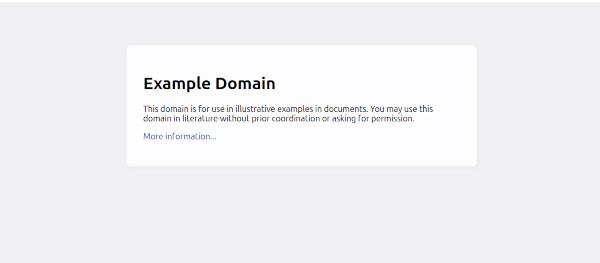
Enter the link to the page for which you want to take a screenshot or export data.
Request:
Response:
remove_modals
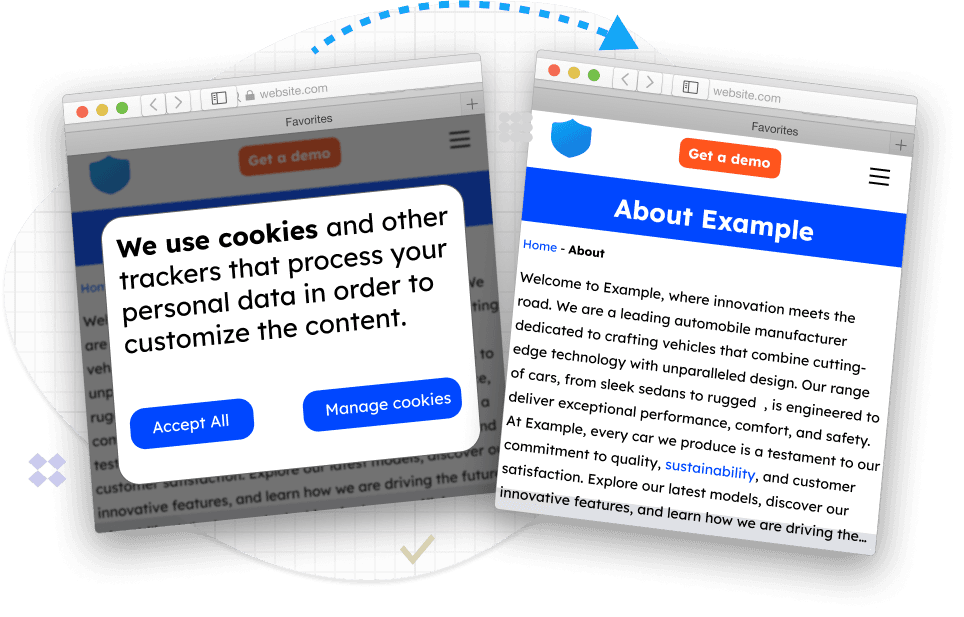
- Title: Remove cookies popup.
- Default value: true
- Available values: true, false
Before taking a screenshot, remove the popup with cookies or other ads that cover the page.
Read more about it in our blog.
response_type
- Title: Response type.
- Default value: image
- Available values: image, json
Generate the output file as an image or JSON with a link to the image.
block_ads
- Title: No Ads.
- Default value: false
- Available values: true, false
Block ads from showing on the page before taking a screenshot.
Proxy
premium_proxy
- Title: Premium proxy.
- Default value: false
- Available values: true, false
Use premium residential proxy to make the request harder to block. Useful when your request is getting blocked. Costs 5 credits per request.
geotargeting
- Title: Proxy country.
- Default value: None
- Available values: List of supported countries
Some content is specific to a region. In these cases, you may want to make your request from a given country. Geotargeting costs an additional 1 credit. Read more here
proxy
- Title: Custom proxy.
- Default value: None
- Available values: Any valid HTTP proxy
Use your own proxy server. Currently, only the HTTP protocol is supported. If you provide a proxy input, the premium proxy and geotargeting settings will be ignored.
Screenshot
image_type
- Title: Image format.
- Default value: jpg
- Available values: jpg, png, webp, pdf
Choose the format of the screenshot output file.
image_quality
- Title: JPG quality.
- Default value: None
- Available values: 0-100
Set the compression rate for the JPG file. PNG does not support compression.
thumbnail_width
- Title: Thumbnail width.
- Default value: None
- Available values: Any positive integer
Enter the width in pixels for the thumbnail. If omitted, the aspect ratio is preserved.
thumbnail_height
- Title: Thumbnail height.
- Default value: None
- Available values: Any positive integer
Enter the height in pixels for the thumbnail. If omitted, the aspect ratio is preserved.
Extract
Sometimes it becomes important to extract exact data such a coordinates and CSS properties for each word or html element on a web page. To get css selector for html elements or for words you need to use below properties. Read more in our blog
You have to send request to special endpoint
extract_elements
- Title: Extract elements
- Default value: false
- Available values: true, false
Export all HTML elements and XPath selectors for them.
Example response:
extract_words
- Title: Extract words.
- Default value: false
- Available values: true, false
Export all words from the page with their positions (x, y, width, height). Useful for building a map of words placed on the page.
Example response:
extract_style
- Title: Extract CSS styles for elements.
- Default value: 0
- Available values: 0, 1, 2
Additionally, for each HTML element, you can export its CSS styles after rendering and loading all scripts.
- 0: Extract only selectors with positions without css properties
- 1: Extract primary css properties for all elements (visibility, display, fontWeight, backgroundImage, cursor, fontSize, color, position, textDecoration, text-decoration-line, backgroundColor)
- 2: Extract all css properties for all elements (will generate big output file)
Example response:
extract_html
- Title: Extract html.
- Default value: false
- Available values: true, false
Download the page's HTML code as soon as all JavaScript is loaded.
extract_text
- Title: Extract clean plain text.
- Default value: false
- Available values: true, false
Get plain text of the page right after rendering. All HTML tags are removed.
Video
video_format
- Title: Video output format
- Default value: mp4
- Available values: [mp4, avi, mov, gif, webm]
Video file format for output (e.g., mp4, avi, etc.). Specifies the encoding format of the final video file. Different formats may affect file size, quality, and compatibility.
Example output response from test website:
video_duration
- Title: Video duration
- Default value: 5
- Available values: [0-30]
Maximum duration of the video in seconds. Defines how long the recording should last. Useful to avoid unnecessarily long videos or to limit processing time.
video_fps
- Title: Video frame per second
- Default value: 15
- Available values: [10-60]
Specifies the frames per second (FPS) for at which the video can be recorded. It accepts an integer between 1 and 60, with a default value of 15. For Gif output file max value is 10. This setting helps control recording smoothness and performance by preventing excessively high frame rates that may increase processing time or resource usage.
gpu_render
- Title: Enables GPU acceleration for the browser run using WebGPU or WebGL
- Default value: false
- Available values: true
Useful for improving rendering performance and handling graphics-intensive tasks.
When disabled, rendering will fall back to CPU processing.
This option cost additional 2 credits
Scrolling
scrolling_enable
- Title: Enable scrolling during record website video
- Default value: false
- Example: true
- Type: boolean
Enable or disable scrolling while recording a website video.
Example output response from test website:
scrolling_algorithm
- Title: Scrolling algorithm
- Default value: ease_in_out_quad
- Available values: [ease_out_quad, ease_in_out_cubic, ease_in_cubic, ease_out_cubic, ease_in_out_quart, ease_in_quart, ease_in_quad, ease_in_out_quad, linear]
Specifies the easing function that controls the speed curve of the scrolling animation. This affects how smooth or linear the scrolling feels. Read more: Scrolling algorithms
scrolling_scroll_duration
- Title: Scroll duration per step (ms)
- Default value: 1500
- Example: 850
- Type: number
How long one scroll step should last (in milliseconds). Determines the duration of a single scroll movement. Affects how fast the page scrolls in one step.
scrolling_scroll_distance
- Title: Scroll distance per step (px)
- Default value: 2000
- Example: 1000
- Type: number
Defines the vertical distance to scroll per step. Larger values scroll more content per step.
scrolling_scroll_delay
- Title: Delay between scroll steps (ms)
- Default value: 500
- Example: 500
- Type: number
Sets the pause between scroll steps. Higher values make scrolling more gradual and less continuous.
scrolling_start_delay
- Title: Delay before scrolling starts (ms)
- Default value: 0
- Example: 500
- Type: number
Adds an initial wait before scrolling begins. Useful to ensure the page is fully loaded first.
scrolling_start_position_y
- Title: Scroll start position Y (px)
- Default value: 0
- Example: 500
- Type: number
Y-position (in pixels) from which to start scrolling. Allows scrolling to begin from a specific vertical offset on the page.
scrolling_stop_after_time
- Title: Stop scrolling after time (ms)
- Default value: 0
- Example: 2500
- Type: number | null
Forces scrolling to stop after a specified amount of time, even if the full scroll distance hasn’t been reached.
scrolling_scroll_to_top_after_time
- Title: Scroll to top after time (ms)
- Default value: 0
- Example: 2500
- Type: number | null
After the specified delay, the page will automatically scroll back to the top.
scrolling_scroll_to_selector
- Title: Scroll until selector
- Default value: ""
- Example: .card-box
- Type: string
Scrolling will stop when the HTML element which matches this CSS selector becomes visible in the viewport. If we look at the below example it will create 10 seconds of video scrolling. The scrolling will finish when the html element with class="price" in the viewport becomes visible.
scrolling_scroll_back_completed
- Title: Scroll back to top after completed
- Default value: true
- Example: false
- Type: boolean
If enabled, the page will be automatically scrolled to the top after finishing the configured scroll steps.
Viewport
full_page
- Title: Full page.
- Default value: false
- Available values: true, false
Check this option if you want to take a screenshot of the entire page.
capture_beyond_viewport
- Title: Capture beyond viewport
- Default value: false
- Available values: true, false
At times, you may want to take a screenshot of a page or an HTML element, and some part of the element is not seen in the viewport. If you set capture_beyond_viewport=true, the whole element will be captured, but if you set capture_beyond_viewport=false, only the part in the viewport will be captured. If you set full_page=true, or use capture_element_selector, then capture_beyond_viewport will be true by default.
viewport_width
- Title: Viewport Width.
- Default value: None
- Available values: Any positive integer
Set the page width (Viewport) in pixels. Set 0 if you want to ignore this parameter.
viewport_height
- Title: Viewport Height.
- Default value: None
- Available values: Any positive integer
Set the page height (Viewport) in pixels. Set 0 if you want to ignore this parameter.
transparent_background
- Title: Transparent background.
- Default value: false
- Available values: true, false
Original background will be removed. Screenshot will be taken with a transparent background. Works only with PNG format.
retina
- Title: Retina.
- Default value: false
- Available values: true, false
This will set the device scale factor = 2, producing a high-resolution retina screenshot.
viewport_is_mobile
- Title: Viewport is mobile.
- Default value: false
- Available values: true, false
Indicates whether the viewport should simulate a mobile device, affecting layout and rendering behavior.
viewport_has_touch
- Title: Viewport has touch.
- Default value: false
- Available values: true, false
Enables touch event support in the viewport, simulating touch-capable devices.
viewport_is_landscape
- Title: Viewport landscape.
- Default value: false
- Available values: true, false
Determines whether the viewport should be in landscape orientation.
viewport_device_scale_factor
- Title: Viewport device scale factor.
- Default value: None
- Available values: Any positive number
Specifies the device scale factor (e.g., pixel density). Useful for simulating high-DPI devices like Retina displays.
Wait for
delay
- Title: Delay seconds.
- Default value: None
- Available values: 0-10
How many seconds to wait after the page is loaded before taking a screenshot. Max 10 seconds.
wait_for_selector
- Title: Wait for CSS selector.
- Default value: None
- Available values: Any valid CSS selector
Before taking the screenshot, wait for the loading of the element with the given CSS selector. The timeout for this operation is 30 seconds. Use to wait until the element exists in DOM, but not necessarily visible.
wait_for_xpath
- Title: Wait for Xpath.
- Default value: None
- Available values: Any valid XPath selector
Before taking the screenshot, wait for the loading of the element with the given XPath selector. The timeout for this operation is 30 seconds. Same as wait_for_selector but wait for xpath selector
Customization
scroll_to_bottom
- Title: Scroll to bottom.
- Default value: false
- Available values: true, false
If you want to scroll to the bottom of the page, check this option for the browser to load all photos.
capture_element_selector
- Title: Capture element.
- Default value: None
- Available values: Any valid CSS selector
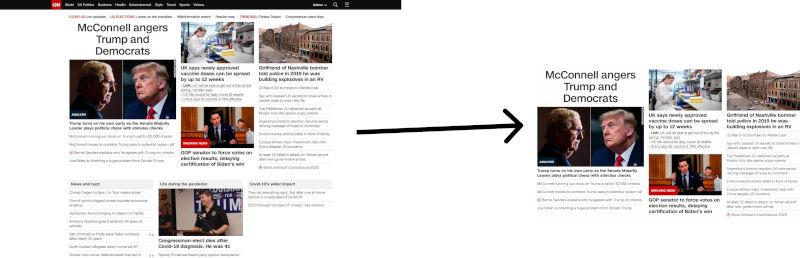
Take a screenshot only of the element on the page that has the CSS selector. Useful for capturing specific elements like tables, card etc.
injection_css
- Title: Injection CSS.
- Default value: None
- Available values: Any valid CSS string
CSS string will be added to the page before the screenshot is taken. For GET requests, it must be URL encoded.
injection_css_url
- Title: Injection CSS file link.
- Default value: None
- Available values: Any valid URL
CSS file will be added to the page before the screenshot is taken.
injection_js
- Title: Injection JavaScript.
- Default value: None
- Available values: Any valid JavaScript string
JavaScript string will be added to the page before the screenshot is taken. For GET requests, it must be URL encoded.
injection_js_url
- Title: Injection JS file link.
- Default value: None
- Available values: Any valid URL
JavaScript URL will be added to the page before the screenshot is taken.
Http request
user_agent
- Title: User-Agent
- Default value: Mozilla/5.0 (Windows NT 10.0; Win64; x64) AppleWebKit/537.36 (KHTML, like Gecko) Chrome/87.0.4280.88 Safari/537.36
- Available values: Any valid browser User-Agent string
Enter a valid browser User-Agent HTTP header value you want to emulate.
accept_language
- Title: Accept-Language HTTP header
- Default value: ""
- Available values: any valid Accept-Language header
Any valid browser User-Agent string
cookies
- Title: Accept-Language HTTP header
- Default value: ``
Provide a list of cookies and values. The cookies will be sent to the server before the screenshot is taken. Cookies for GET request have to be URL encoded.
headers
- Title: HTTP headers
- Default value: ``
Provide a list of HTTP headers. Headers will be sent to the server before the screenshot is taken.
Example: Accept: text/html;q=0.9, image/jpeg, /;q=0.8 Cookie: SESSIONID=SS59Ryy83rSS59Ryy83r
Headers for GET request have to be URL encoded.
timezone
- Title: HTTP timezone
- Default value: Europe/London
- Available values: String
Enter the time zone for the browser. Use timezone from website
fail_statuscode
- Title: Status codes fail
- Default value: UTC
- Available values: http codes
Enter the http codes for which the browser should not take a screenshot. You can enter the codes by separating them with a comma or enter a range. If the page doesn't exist then don't take a picture. Code example: 403,404,500-511
The following attributes will work if you choose image_type=pdf.
pdf_format
- Title: Format.
- Default value: a4
- Available values: a0, a1, a2, a3, a4, a5, a6, legal, letter, tabloid
Defines the paper size to be used for generating the PDF.
Defines the paper size to be used for generating the PDF. You can choose from the following formats:
- a0: ISO A0 (841 × 1189 mm)
- a1: ISO A1 (594 × 841 mm)
- a2: ISO A2 (420 × 594 mm)
- a3: ISO A3 (297 × 420 mm)
- a4: ISO A4 (210 × 297 mm)
- a5: ISO A5 (148 × 210 mm)
- a6: ISO A6 (105 × 148 mm)
- legal: Legal size (8.5 × 14 inches)
- letter: Letter size (8.5 × 11 inches) — this is the default setting
- tabloid: Tabloid size (11 × 17 inches)
If no paper size is explicitly set, the output will default to A4.
pdf_print_background
- Title: Print background.
- Default value: false
- Available values: true, false
Set to true to print background graphics.
pdf_landscape
- Title: Landscape.
- Default value: false
- Available values: true, false
Set to true to set PDF orientation to landscape. It is false by default.
pdf_prefer_css_page_size
- Title: Prefer CSS page size.
- Default value: false
- Available values: true, false
Give any CSS @page size declared in the page priority over what is declared in the width or height or format option.
pdf_margin_top
- Title: Margin top.
- Default value: 0
- Available values: Any valid CSS size
Specifies the margin from top for the PDF file. By default, the margin is 0.
pdf_margin_bottom
- Title: Margin bottom.
- Default value: 0
- Available values: Any valid CSS size
Specifies the margin from bottom for the PDF file. By default, the margin is 0.
pdf_margin_left
- Title: Margin left.
- Default value: 0
- Available values: Any valid CSS size
Specifies the margin left for the PDF file. By default, the margin is 0.
pdf_margin_right
- Title: Margin right.
- Default value: 0
- Available values: Any valid CSS size
Specifies the margin right for the PDF file. By default, the margin is 0.
Storage
s3_signed_url
- Title: S3 Signed URL.
- Default value: ``
- Available values: Any valid signed URL
A signed URL for uploading to an Amazon S3 bucket is a URL that includes authentication information in the query string. This allows clients with the URL to upload objects to the specified S3 bucket without needing AWS security credentials. Read article in our blog how to generate signed url for s3 bucket
- Previous
- Premium Proxy
- Next
- Rate limits