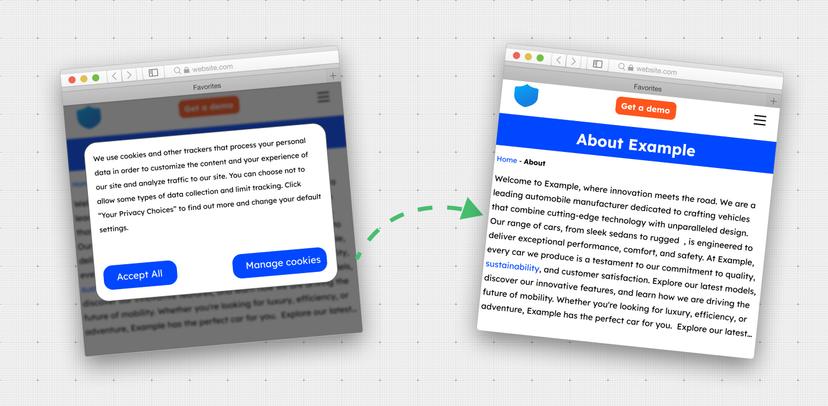
By adding a single parameter remove_modals to the REST request, this algorithm seamlessly removes cookie pop-ups and modals, offering a solution to take screenshot without cookies popup.
The scrolling_algorithm parameter defines how video scrolling speed varies over time when recording a scrolling screenshot video.
The behaviour is largely drawn from easing functions commonly referenced in animations. Each algorithm dictates whether the scroll feels linear, smooth, accelerating, or decelerating.
Select the relevant scrolling algorithm to create videos with the desired pacing and style.
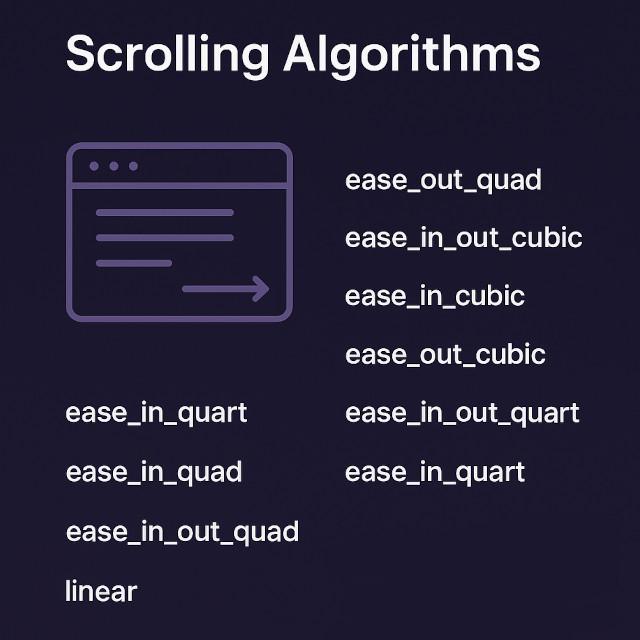
Below is a summary of all supported scrolling algorithms:
ease_in_out_quad (Default)
This is the default algorithm and one of the most balanced. It starts slow, speeds up in the middle, and slows down again at the end. It provides smoothness, without too much drama, making it a dependable option to use for most scenarios.
ease_out_quad
The scrolling function in this algorithm starts off with a quick scroll speed and slows down towards the end of each step. It will provide some natural decelerating that feels smooth and natural and is enjoyable to use. It works best with presenting content where the attention is meant to settle at the final position.
ease_in_out_cubic
This type of scrolling begins slow, accelerates to a faster pace in the middle, and then slows down again before stopping. It provides an established balanced, cinematic feel, and is well suited for business demos and presentations.
ease_in_cubic
Scrolling commences very slowly and then smoothly gains speed. This is useful when you want to mark the beginning of a scroll step with emphasis and time for viewers to experience the starting area before midstream down the page.
ease_out_cubic
Just the opposite of ease_in_cubic — this algorithm starts fast, and slows down as it completes. Use this for situations where you want the scrolling to feel very dynamic at the outset and calm and under control toward the end.
ease_in_out_quart
This easing function produces an even smoother curve than cubic easing, starting and ending very gently while moving faster in the middle. It creates an elegant, highly polished scrolling experience for long-form pages or product showcases.
ease_in_quart
A stronger version of the cubic easing that starts very gently and accelerates more noticeably. It’s useful when you want to build anticipation at the start of the scroll, giving the impression of gradual momentum building up.
ease_in_quad
The scrolling starts at lower speed and ends at a little higher. This method of scrolling works well for content where we are attempting a gradual shift in focus and we are pushing the attention curve down the page.
linear
With this algorithm, the scrolling speed remains constant from start to finish. It does not accelerate or decelerate, making it the simplest option. Linear scrolling is useful for testing, debugging, or when you want a consistent, mechanical feel.
Conclusion
Choosing the scrolling algorithm you want means you can also control the mood and pace of the recording. Whether it be a fast-paced, high-energy scrolling; finely tuned, smooth cinematic transitions; or steady scrolling like you're a painter, you have options that let you tailor your videos to your specifications.